
 Judd
01245f5b16
llama : fix order of parameters (#8706)
Judd
01245f5b16
llama : fix order of parameters (#8706)
|
1 سال پیش | |
|---|---|---|
| .devops | 1 سال پیش | |
| .github | 1 سال پیش | |
| ci | 1 سال پیش | |
| cmake | 1 سال پیش | |
| common | 1 سال پیش | |
| docs | 1 سال پیش | |
| examples | 1 سال پیش | |
| ggml | 1 سال پیش | |
| gguf-py | 1 سال پیش | |
| grammars | 1 سال پیش | |
| include | 1 سال پیش | |
| media | 1 سال پیش | |
| models | 1 سال پیش | |
| pocs | 1 سال پیش | |
| prompts | 2 سال پیش | |
| requirements | 1 سال پیش | |
| scripts | 1 سال پیش | |
| spm-headers | 1 سال پیش | |
| src | 1 سال پیش | |
| tests | 1 سال پیش | |
| .clang-tidy | 1 سال پیش | |
| .dockerignore | 1 سال پیش | |
| .ecrc | 1 سال پیش | |
| .editorconfig | 1 سال پیش | |
| .flake8 | 1 سال پیش | |
| .gitignore | 1 سال پیش | |
| .gitmodules | 1 سال پیش | |
| .pre-commit-config.yaml | 1 سال پیش | |
| AUTHORS | 1 سال پیش | |
| CMakeLists.txt | 1 سال پیش | |
| CMakePresets.json | 1 سال پیش | |
| CONTRIBUTING.md | 1 سال پیش | |
| LICENSE | 1 سال پیش | |
| Makefile | 1 سال پیش | |
| Package.swift | 1 سال پیش | |
| README.md | 1 سال پیش | |
| SECURITY.md | 1 سال پیش | |
| convert_hf_to_gguf.py | 1 سال پیش | |
| convert_hf_to_gguf_update.py | 1 سال پیش | |
| convert_llama_ggml_to_gguf.py | 1 سال پیش | |
| convert_lora_to_gguf.py | 1 سال پیش | |
| flake.lock | 1 سال پیش | |
| flake.nix | 1 سال پیش | |
| mypy.ini | 2 سال پیش | |
| poetry.lock | 1 سال پیش | |
| pyproject.toml | 1 سال پیش | |
| pyrightconfig.json | 1 سال پیش | |
| requirements.txt | 1 سال پیش |
README.md
llama.cpp



Roadmap / Project status / Manifesto / ggml
Inference of Meta's LLaMA model (and others) in pure C/C++
[!IMPORTANT] [2024 Jun 12] Binaries have been renamed w/ a
llama-prefix.mainis nowllama-cli,serverisllama-server, etc (https://github.com/ggerganov/llama.cpp/pull/7809)
Recent API changes
- [2024 Jun 26] The source code and CMake build scripts have been restructured https://github.com/ggerganov/llama.cpp/pull/8006
- [2024 Apr 21]
llama_token_to_piececan now optionally render special tokens https://github.com/ggerganov/llama.cpp/pull/6807 - [2024 Apr 4] State and session file functions reorganized under
llama_state_*https://github.com/ggerganov/llama.cpp/pull/6341 - [2024 Mar 26] Logits and embeddings API updated for compactness https://github.com/ggerganov/llama.cpp/pull/6122
- [2024 Mar 13] Add
llama_synchronize()+llama_context_params.n_ubatchhttps://github.com/ggerganov/llama.cpp/pull/6017 - [2024 Mar 8]
llama_kv_cache_seq_rm()returns aboolinstead ofvoid, and newllama_n_seq_max()returns the upper limit of acceptableseq_idin batches (relevant when dealing with multiple sequences) https://github.com/ggerganov/llama.cpp/pull/5328 - [2024 Mar 4] Embeddings API updated https://github.com/ggerganov/llama.cpp/pull/5796
- [2024 Mar 3]
struct llama_context_paramshttps://github.com/ggerganov/llama.cpp/pull/5849
Hot topics
convert.pyhas been deprecated and moved toexamples/convert_legacy_llama.py, please useconvert_hf_to_gguf.pyhttps://github.com/ggerganov/llama.cpp/pull/7430- Initial Flash-Attention support: https://github.com/ggerganov/llama.cpp/pull/5021
- BPE pre-tokenization support has been added: https://github.com/ggerganov/llama.cpp/pull/6920
- MoE memory layout has been updated - reconvert models for
mmapsupport and regenerateimatrixhttps://github.com/ggerganov/llama.cpp/pull/6387 - Model sharding instructions using
gguf-splithttps://github.com/ggerganov/llama.cpp/discussions/6404 - Fix major bug in Metal batched inference https://github.com/ggerganov/llama.cpp/pull/6225
- Multi-GPU pipeline parallelism support https://github.com/ggerganov/llama.cpp/pull/6017
- Looking for contributions to add Deepseek support: https://github.com/ggerganov/llama.cpp/issues/5981
- Quantization blind testing: https://github.com/ggerganov/llama.cpp/discussions/5962
- Initial Mamba support has been added: https://github.com/ggerganov/llama.cpp/pull/5328
Description
The main goal of llama.cpp is to enable LLM inference with minimal setup and state-of-the-art performance on a wide
variety of hardware - locally and in the cloud.
- Plain C/C++ implementation without any dependencies
- Apple silicon is a first-class citizen - optimized via ARM NEON, Accelerate and Metal frameworks
- AVX, AVX2 and AVX512 support for x86 architectures
- 1.5-bit, 2-bit, 3-bit, 4-bit, 5-bit, 6-bit, and 8-bit integer quantization for faster inference and reduced memory use
- Custom CUDA kernels for running LLMs on NVIDIA GPUs (support for AMD GPUs via HIP)
- Vulkan and SYCL backend support
- CPU+GPU hybrid inference to partially accelerate models larger than the total VRAM capacity
Since its inception, the project has improved significantly thanks to many contributions. It is the main playground for developing new features for the ggml library.
Supported models:
Typically finetunes of the base models below are supported as well.
- [X] LLaMA 🦙
- LLaMA 2 🦙🦙
- LLaMA 3 🦙🦙🦙
- [X] Mistral 7B
- Mixtral MoE
- DBRX
- [X] Falcon
- [X] Chinese LLaMA / Alpaca and Chinese LLaMA-2 / Alpaca-2
- [X] Vigogne (French)
- [X] BERT
- [X] Koala
- [X] Baichuan 1 & 2 + derivations
- [X] Aquila 1 & 2
- [X] Starcoder models
- [X] Refact
- [X] MPT
- [X] Bloom
- Yi models
- [X] StableLM models
- Deepseek models
- Qwen models
- PLaMo-13B
- Phi models
- GPT-2
- Orion 14B
- InternLM2
- CodeShell
- Gemma
- Mamba
- Grok-1
- Xverse
- Command-R models
- SEA-LION
- GritLM-7B + GritLM-8x7B
- OLMo
- GPT-NeoX + Pythia
- ChatGLM3-6b + ChatGLM4-9b
(instructions for supporting more models: HOWTO-add-model.md)
Multimodal models:
- LLaVA 1.5 models, LLaVA 1.6 models
- BakLLaVA
- Obsidian
- ShareGPT4V
- MobileVLM 1.7B/3B models
- Yi-VL
- Mini CPM
- Moondream
- Bunny
Bindings:
- Python: abetlen/llama-cpp-python
- Go: go-skynet/go-llama.cpp
- Node.js: withcatai/node-llama-cpp
- JS/TS (llama.cpp server client): lgrammel/modelfusion
- JavaScript/Wasm (works in browser): tangledgroup/llama-cpp-wasm
- Typescript/Wasm (nicer API, available on npm): ngxson/wllama
- Ruby: yoshoku/llama_cpp.rb
- Rust (more features): edgenai/llama_cpp-rs
- Rust (nicer API): mdrokz/rust-llama.cpp
- Rust (more direct bindings): utilityai/llama-cpp-rs
- C#/.NET: SciSharp/LLamaSharp
- Scala 3: donderom/llm4s
- Clojure: phronmophobic/llama.clj
- React Native: mybigday/llama.rn
- Java: kherud/java-llama.cpp
- Zig: deins/llama.cpp.zig
- Flutter/Dart: netdur/llama_cpp_dart
- PHP (API bindings and features built on top of llama.cpp): distantmagic/resonance (more info)
- Guile Scheme: guile_llama_cpp
UI:
Unless otherwise noted these projects are open-source with permissive licensing:
- MindWorkAI/AI-Studio (FSL-1.1-MIT)
- iohub/collama
- janhq/jan (AGPL)
- nat/openplayground
- Faraday (proprietary)
- LMStudio (proprietary)
- Layla (proprietary)
- LocalAI (MIT)
- LostRuins/koboldcpp (AGPL)
- Mozilla-Ocho/llamafile
- nomic-ai/gpt4all
- ollama/ollama
- oobabooga/text-generation-webui (AGPL)
- psugihara/FreeChat
- cztomsik/ava (MIT)
- ptsochantaris/emeltal
- pythops/tenere (AGPL)
- RAGNA Desktop (proprietary)
- RecurseChat (proprietary)
- semperai/amica
- withcatai/catai
- Mobile-Artificial-Intelligence/maid (MIT)
- Msty (proprietary)
- LLMFarm (MIT)
- KanTV(Apachev2.0 or later)
- Dot (GPL)
- MindMac (proprietary)
- KodiBot (GPL)
- eva (MIT)
- AI Sublime Text plugin (MIT)
- AIKit (MIT)
- LARS - The LLM & Advanced Referencing Solution (AGPL)
(to have a project listed here, it should clearly state that it depends on llama.cpp)
Tools:
- akx/ggify – download PyTorch models from HuggingFace Hub and convert them to GGML
- crashr/gppm – launch llama.cpp instances utilizing NVIDIA Tesla P40 or P100 GPUs with reduced idle power consumption
Infrastructure:
- Paddler - Stateful load balancer custom-tailored for llama.cpp
Games:
- Lucy's Labyrinth - A simple maze game where agents controlled by an AI model will try to trick you.
Demo
Typical run using LLaMA v2 13B on M2 Ultra
``` $ make -j && ./llama-cli -m models/llama-13b-v2/ggml-model-q4_0.gguf -p "Building a website can be done in 10 simple steps:\nStep 1:" -n 400 -e I llama.cpp build info: I UNAME_S: Darwin I UNAME_P: arm I UNAME_M: arm64 I CFLAGS: -I. -O3 -std=c11 -fPIC -DNDEBUG -Wall -Wextra -Wpedantic -Wcast-qual -Wdouble-promotion -Wshadow -Wstrict-prototypes -Wpointer-arith -Wmissing-prototypes -pthread -DGGML_USE_K_QUANTS -DGGML_USE_ACCELERATE I CXXFLAGS: -I. -I./common -O3 -std=c++11 -fPIC -DNDEBUG -Wall -Wextra -Wpedantic -Wcast-qual -Wno-unused-function -Wno-multichar -pthread -DGGML_USE_K_QUANTS I LDFLAGS: -framework Accelerate I CC: Apple clang version 14.0.3 (clang-1403.0.22.14.1) I CXX: Apple clang version 14.0.3 (clang-1403.0.22.14.1) make: Nothing to be done for `default'. main: build = 1041 (cf658ad)
main: seed = 1692823051
llama_model_loader: loaded meta data with 16 key-value pairs and 363 tensors from models/llama-13b-v2/ggml-model-q4_0.gguf (version GGUF V1 (latest))
llama_model_loader: - type f32: 81 tensors
llama_model_loader: - type q4_0: 281 tensors
llama_model_loader: - type q6_K: 1 tensors
llm_load_print_meta: format = GGUF V1 (latest)
llm_load_print_meta: arch = llama
llm_load_print_meta: vocab type = SPM
llm_load_print_meta: n_vocab = 32000
llm_load_print_meta: n_merges = 0
llm_load_print_meta: n_ctx_train = 4096
llm_load_print_meta: n_ctx = 512
llm_load_print_meta: n_embd = 5120
llm_load_print_meta: n_head = 40
llm_load_print_meta: n_head_kv = 40
llm_load_print_meta: n_layer = 40
llm_load_print_meta: n_rot = 128
llm_load_print_meta: n_gqa = 1
llm_load_print_meta: f_norm_eps = 1.0e-05
llm_load_print_meta: f_norm_rms_eps = 1.0e-05
llm_load_print_meta: n_ff = 13824
llm_load_print_meta: freq_base = 10000.0
llm_load_print_meta: freq_scale = 1
llm_load_print_meta: model type = 13B
llm_load_print_meta: model ftype = mostly Q4_0
llm_load_print_meta: model size = 13.02 B
llm_load_print_meta: general.name = LLaMA v2
llm_load_print_meta: BOS token = 1 'Demo of running both LLaMA-7B and whisper.cpp on a single M1 Pro MacBook
And here is another demo of running both LLaMA-7B and [whisper.cpp](https://github.com/ggerganov/whisper.cpp) on a single M1 Pro MacBook: https://user-images.githubusercontent.com/1991296/224442907-7693d4be-acaa-4e01-8b4f-add84093ff.mp4
Usage
Here are the end-to-end binary build and model conversion steps for most supported models.
Basic usage
Firstly, you need to get the binary. There are different methods that you can follow:
- Method 1: Clone this repository and build locally, see how to build
- Method 2: If you are using MacOS or Linux, you can install llama.cpp via brew, flox or nix
- Method 3: Use a Docker image, see documentation for Docker
- Method 4: Download pre-built binary from releases
You can run a basic completion using this command:
llama-cli -m your_model.gguf -p "I believe the meaning of life is" -n 128

# Output:
# I believe the meaning of life is to find your own truth and to live in accordance with it. For me, this means being true to myself and following my passions, even if they don't align with societal expectations. I think that's what I love about yoga – it's not just a physical practice, but a spiritual one too. It's about connecting with yourself, listening to your inner voice, and honoring your own unique journey.
See this page for a full list of parameters.
Conversation mode
If you want a more ChatGPT-like experience, you can run in conversation mode by passing -cnv as a parameter:
llama-cli -m your_model.gguf -p "You are a helpful assistant" -cnv

# Output:
# > hi, who are you?
# Hi there! I'm your helpful assistant! I'm an AI-powered chatbot designed to assist and provide information to users like you. I'm here to help answer your questions, provide guidance, and offer support on a wide range of topics. I'm a friendly and knowledgeable AI, and I'm always happy to help with anything you need. What's on your mind, and how can I assist you today?
#
# > what is 1+1?
# Easy peasy! The answer to 1+1 is... 2!
By default, the chat template will be taken from the input model. If you want to use another chat template, pass --chat-template NAME as a parameter. See the list of supported templates
./llama-cli -m your_model.gguf -p "You are a helpful assistant" -cnv --chat-template chatml
You can also use your own template via in-prefix, in-suffix and reverse-prompt parameters:
./llama-cli -m your_model.gguf -p "You are a helpful assistant" -cnv --in-prefix 'User: ' --reverse-prompt 'User:'
Web server
llama.cpp web server is a lightweight OpenAI API compatible HTTP server that can be used to serve local models and easily connect them to existing clients.
Example usage:
./llama-server -m your_model.gguf --port 8080

# Basic web UI can be accessed via browser: http://localhost:8080
# Chat completion endpoint: http://localhost:8080/v1/chat/completions
Interactive mode
[!NOTE] If you prefer basic usage, please consider using conversation mode instead of interactive mode
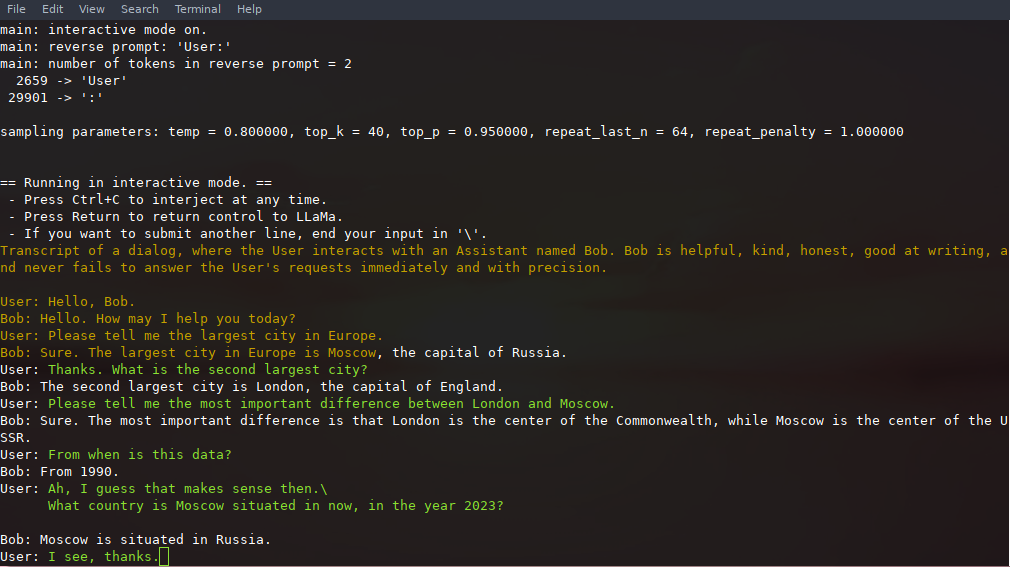
In this mode, you can always interrupt generation by pressing Ctrl+C and entering one or more lines of text, which will be converted into tokens and appended to the current context. You can also specify a reverse prompt with the parameter -r "reverse prompt string". This will result in user input being prompted whenever the exact tokens of the reverse prompt string are encountered in the generation. A typical use is to use a prompt that makes LLaMA emulate a chat between multiple users, say Alice and Bob, and pass -r "Alice:".
Here is an example of a few-shot interaction, invoked with the command
# default arguments using a 7B model
./examples/chat.sh

# advanced chat with a 13B model
./examples/chat-13B.sh

# custom arguments using a 13B model
./llama-cli -m ./models/13B/ggml-model-q4_0.gguf -n 256 --repeat_penalty 1.0 --color -i -r "User:" -f prompts/chat-with-bob.txt
Note the use of --color to distinguish between user input and generated text. Other parameters are explained in more detail in the README for the llama-cli example program.
Persistent Interaction
The prompt, user inputs, and model generations can be saved and resumed across calls to ./llama-cli by leveraging --prompt-cache and --prompt-cache-all. The ./examples/chat-persistent.sh script demonstrates this with support for long-running, resumable chat sessions. To use this example, you must provide a file to cache the initial chat prompt and a directory to save the chat session, and may optionally provide the same variables as chat-13B.sh. The same prompt cache can be reused for new chat sessions. Note that both prompt cache and chat directory are tied to the initial prompt (PROMPT_TEMPLATE) and the model file.
# Start a new chat
PROMPT_CACHE_FILE=chat.prompt.bin CHAT_SAVE_DIR=./chat/default ./examples/chat-persistent.sh

# Resume that chat
PROMPT_CACHE_FILE=chat.prompt.bin CHAT_SAVE_DIR=./chat/default ./examples/chat-persistent.sh

# Start a different chat with the same prompt/model
PROMPT_CACHE_FILE=chat.prompt.bin CHAT_SAVE_DIR=./chat/another ./examples/chat-persistent.sh

# Different prompt cache for different prompt/model
PROMPT_TEMPLATE=./prompts/chat-with-bob.txt PROMPT_CACHE_FILE=bob.prompt.bin \
    CHAT_SAVE_DIR=./chat/bob ./examples/chat-persistent.sh
Constrained output with grammars
llama.cpp supports grammars to constrain model output. For example, you can force the model to output JSON only:
./llama-cli -m ./models/13B/ggml-model-q4_0.gguf -n 256 --grammar-file grammars/json.gbnf -p 'Request: schedule a call at 8pm; Command:'
The grammars/ folder contains a handful of sample grammars. To write your own, check out the GBNF Guide.
For authoring more complex JSON grammars, you can also check out https://grammar.intrinsiclabs.ai/, a browser app that lets you write TypeScript interfaces which it compiles to GBNF grammars that you can save for local use. Note that the app is built and maintained by members of the community, please file any issues or FRs on its repo and not this one.
Build
Please refer to Build llama.cpp locally
Supported backends
| Backend | Target devices |
|---|---|
| Metal | Apple Silicon |
| BLAS | All |
| BLIS | All |
| SYCL | Intel and Nvidia GPU |
| CUDA | Nvidia GPU |
| hipBLAS | AMD GPU |
| Vulkan | GPU |
Tools
Prepare and Quantize
[!NOTE] You can use the GGUF-my-repo space on Hugging Face to quantise your model weights without any setup too. It is synced from
llama.cppmain every 6 hours.
To obtain the official LLaMA 2 weights please see the Obtaining and using the Facebook LLaMA 2 model section. There is also a large selection of pre-quantized gguf models available on Hugging Face.
Note: convert.py has been moved to examples/convert_legacy_llama.py and shouldn't be used for anything other than Llama/Llama2/Mistral models and their derivatives.
It does not support LLaMA 3, you can use convert_hf_to_gguf.py with LLaMA 3 downloaded from Hugging Face.
To learn more about quantizing model, read this documentation
Perplexity (measuring model quality)
You can use the perplexity example to measure perplexity over a given prompt (lower perplexity is better).
For more information, see https://huggingface.co/docs/transformers/perplexity.
To learn more how to measure perplexity using llama.cpp, read this documentation
Contributing
- Contributors can open PRs
- Collaborators can push to branches in the
llama.cpprepo and merge PRs into themasterbranch - Collaborators will be invited based on contributions
- Any help with managing issues and PRs is very appreciated!
- See good first issues for tasks suitable for first contributions
- Read the CONTRIBUTING.md for more information
- Make sure to read this: Inference at the edge
- A bit of backstory for those who are interested: Changelog podcast
Other documentations
Development documentations
Seminal papers and background on the models
If your issue is with model generation quality, then please at least scan the following links and papers to understand the limitations of LLaMA models. This is especially important when choosing an appropriate model size and appreciating both the significant and subtle differences between LLaMA models and ChatGPT:
- LLaMA:
- GPT-3
- GPT-3.5 / InstructGPT / ChatGPT: